When building a YouTube channel, the banner image (also known as the channel cover) is often the first visual element viewers notice when visiting the channel page. A banner designed with the correct YouTube banner size not only makes the channel look more professional but also ensures that all important content displays clearly across different devices, from smartphones to large-screen TVs.
This guide explains the current standard YouTube banner dimensions, how banners are displayed on various devices, and the key design considerations to avoid common mistakes when creating a channel banner.
What Is a YouTube Banner and Why Banner Size Matters
A YouTube banner—also referred to as channel art or a YouTube cover photo—is the large image displayed at the top of a channel’s homepage. Unlike individual video thumbnails, the banner represents the channel as a whole, communicating its theme, style, and overall message.
Understanding the size of YouTube banner is essential because:
- YouTube displays banners differently depending on the device
- Incorrect dimensions can cause important content to be cropped
- Text and logos may become misaligned or hard to read on mobile devices
The banner is essentially the “face” of a YouTube channel. It creates the first impression for new visitors and plays a role in whether they choose to explore the channel further. A properly sized banner improves visual consistency and strengthens brand recognition.
For these reasons, knowing the correct banner dimensions is a mandatory first step before starting the design process.
Standard YouTube Banner Dimensions
YouTube recommends using one banner size that adapts automatically to different screen sizes and resolutions.
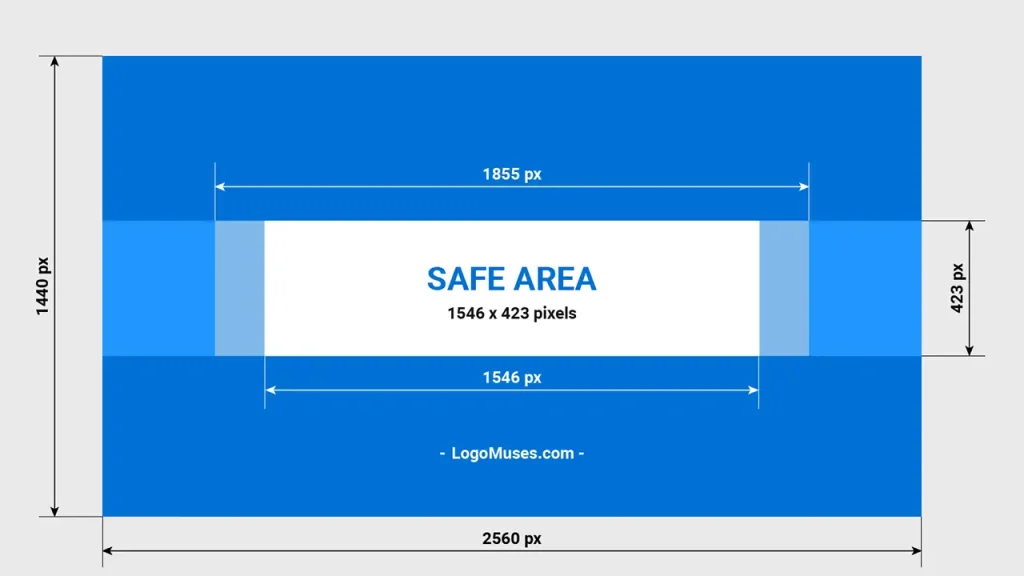
The recommended YouTube banner size is 2560 × 1440 pixels. This resolution is designed to ensure clear and sharp display across a wide range of devices, including TVs, desktop monitors, laptops, and mobile phones.
Recommended YouTube Banner Measurements:
- Image size: 2560 × 1440 pixels
- Aspect ratio: 16:9
- Maximum file size: 6 MB
- Supported formats: JPG, PNG
These YouTube banner measurements represent the largest background size, ensuring high-quality display on large and high-resolution screens such as TVs.
YouTube Banner Size and Safe Area Explained
Although YouTube allows large banner images, not every part of the image is visible on all devices. Depending on screen size, YouTube automatically crops and adjusts the banner display, which means the outer edges may not always appear. Understanding the safe area is therefore critical when designing a banner.
1. What Is the Safe Area?
The safe area is the central portion of the YouTube banner that remains consistently visible across all devices. Whether viewers access the channel on mobile, desktop, or TV, content placed within this area will not be cut off.
For this reason, essential elements such as logos, channel names, and core messages should always be positioned inside the safe area to maintain visual consistency and brand recognition in every viewing context.
2. YouTube Banner Dimensions Across Devices
While the original upload size remains 2560 × 1440 pixels, the visible area changes depending on the device. This behavior is a direct result of how YouTube banner size and YouTube banner dimensions are displayed responsively across different screen types on YouTube. As a result, the actual size of YouTube banner that viewers see may vary between desktop, tablet, and mobile devices, even though the uploaded image file remains the same.
- Desktop:
The banner displays nearly the full width, but with limited height—approximately 2560 × 430 pixels. - Tablet:
The visible area is reduced to around 1855 × 423 pixels, cropping both the left and right sides. - Mobile:
This device shows the smallest visible area, displaying only the central portion at roughly 1546 × 423 pixels.
Because of these variations, the central area is considered the safe zone. All critical content should be placed within this space to ensure proper display, especially on mobile devices, which account for the majority of user traffic today.
Common Mistakes When Designing a YouTube Banner
Many YouTube channels invest heavily in content quality but still appear unprofessional due to banner design issues. In most cases, the problem lies not in the visuals themselves, but in ignoring the actual YouTube banner dimensions and safe area guidelines.
Common mistakes include:
- Placing text or logos outside the safe area
- Using low-resolution images that appear blurry on TVs
- Adding too much text, making it hard to read on small screens
- Designing banners using thumbnail or Facebook image sizes
- Failing to test the banner on multiple devices
Avoiding these errors can significantly improve the overall visual quality of a channel.
Tips for Designing an Effective YouTube Banner
An effective YouTube banner balances visual appeal with practical display requirements. Designing with correct dimensions, a clear layout, and strong visual hierarchy helps prevent cropping issues and ensures consistent presentation.
Key recommendations include:
- Start designing on a 2560 × 1440 pixel canvas
- Enable safe area guides in Photoshop, Figma, or Canva
- Use high-quality images with a clear visual focus
- Keep colors simple and aligned with the channel’s brand identity
- Choose readable fonts and avoid overly thin or small text
- Preview the banner on both desktop and mobile before publishing
These practices help ensure the final YouTube cover photo dimensions work consistently across all devices.
Ready to design your YouTube banner
The correct YouTube banner size is more than just a technical specification. It is the foundation of a channel’s professional and consistent visual identity. By following the recommended YouTube banner measurements, respecting the safe area, and using a clear layout, creators can avoid most common design mistakes.
Whether you are starting a new channel or refreshing an existing one, reviewing your banner should be a top priority. It is often the first visual touchpoint for new viewers and plays an important role in shaping their first impression.
Good luck with building and growing your YouTube channel!